
Focus Local
Login into Setup (Wrench Icon > Setup)
Navigate to Customers > Gift Cards
Choose Export
Reset Export field using NONE option
Select Account #, Balance and Activated in Available Fields column and use the move arrow to move those to the included fields
Not the filename and path where the export will be saved
Press Ok
Navigate to the File just created and rename to <MerchantName>-<MID>-<FocushardwareKey>
Send file to the Gift Card Team
myFocus Gift
Browse to https://my.focuspos.com/Login.aspx
Login with your myFocus restaurant group credentials (role will need to be Store Owner or Corp Admin)
Navigate Menu dropdown Gift/Loyalty to the Gift/Loyalty page
Select GC Circulation Report
Choose either ALL stores or individuals depending on how your accountability is for Gift Cards (Corp Float vs Store Liability)
Active Status = All
Card Type = All
**Leave Card Range fields EMPTY
View Report
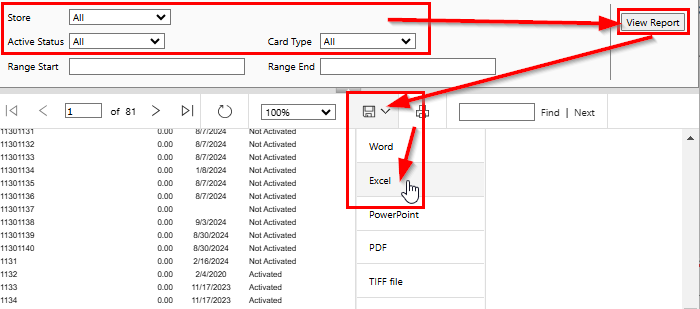
To Export choose the Save Icon and select Excel
The file will be downloaded to your browsers default download path or may prompt for where to save depending on browsers configuration
Navigate to the File just created and rename to <MerchantName>-<MID>-<FocushardwareKey>
Send file to the Gift Card Team
Comments
0 comments
Please sign in to leave a comment.